The 60-second answer
Pick a high-airflow type if...
- Large intake/exhaust openings, low resistance
- Outdoor cabinets can pair with intake dust filter
- Mostly empty interior — the job is "moving air"
- Typical: IT rooms, open racks, outdoor control cabinets
Pick a high-static-pressure type if...
- Dense fins, long ducts, multiple bends
- Enclosure packed with components, high resistance
- Need to "push" air through obstructions
- Typical: servers, inverters, HVAC ductwork, automotive
Look at the operating point, not max CFM
- The headline number is a zero-resistance limit
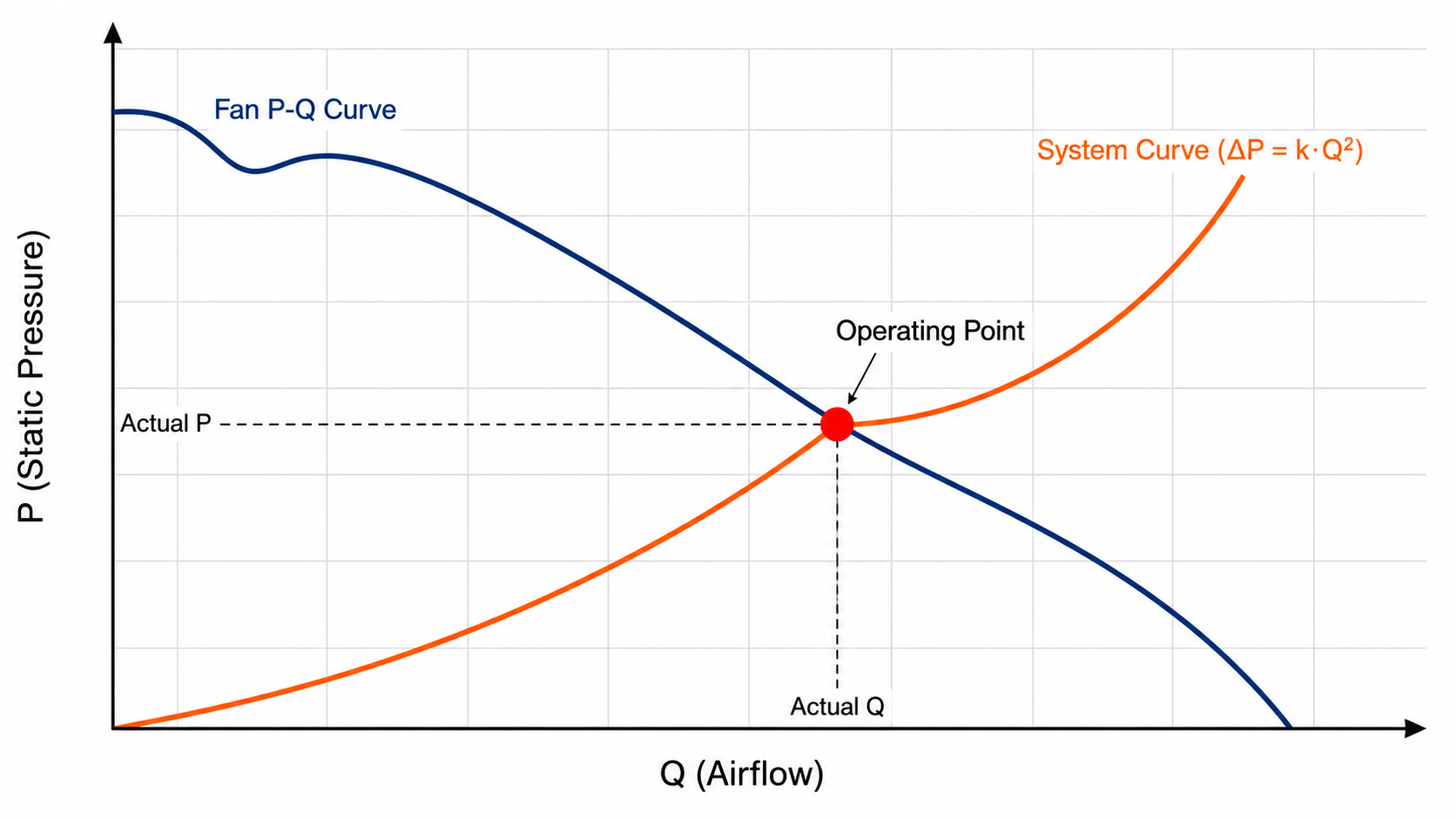
- Real performance = "fan curve ∩ system curve"
- Valid operating point lies in the middle 30-70%
- No P-Q curve = unreliable spec
P-Q curve fundamentals
The P-Q curve is the single most important chart on a fan datasheet — more important than max CFM, max RPM, or L10 lifetime — because it tells you the fan's "capability boundary".
Axis definitions
- X axis — Q (airflow): in CFM (cubic feet per minute) or m³/min; the volume of air passing through per unit time
- Y axis — P (static pressure): in mmH2O, inH2O, or Pa; the resistance the fan can overcome
Physical meaning of the two curve endpoints
| Position | Physical meaning | Datasheet label |
|---|---|---|
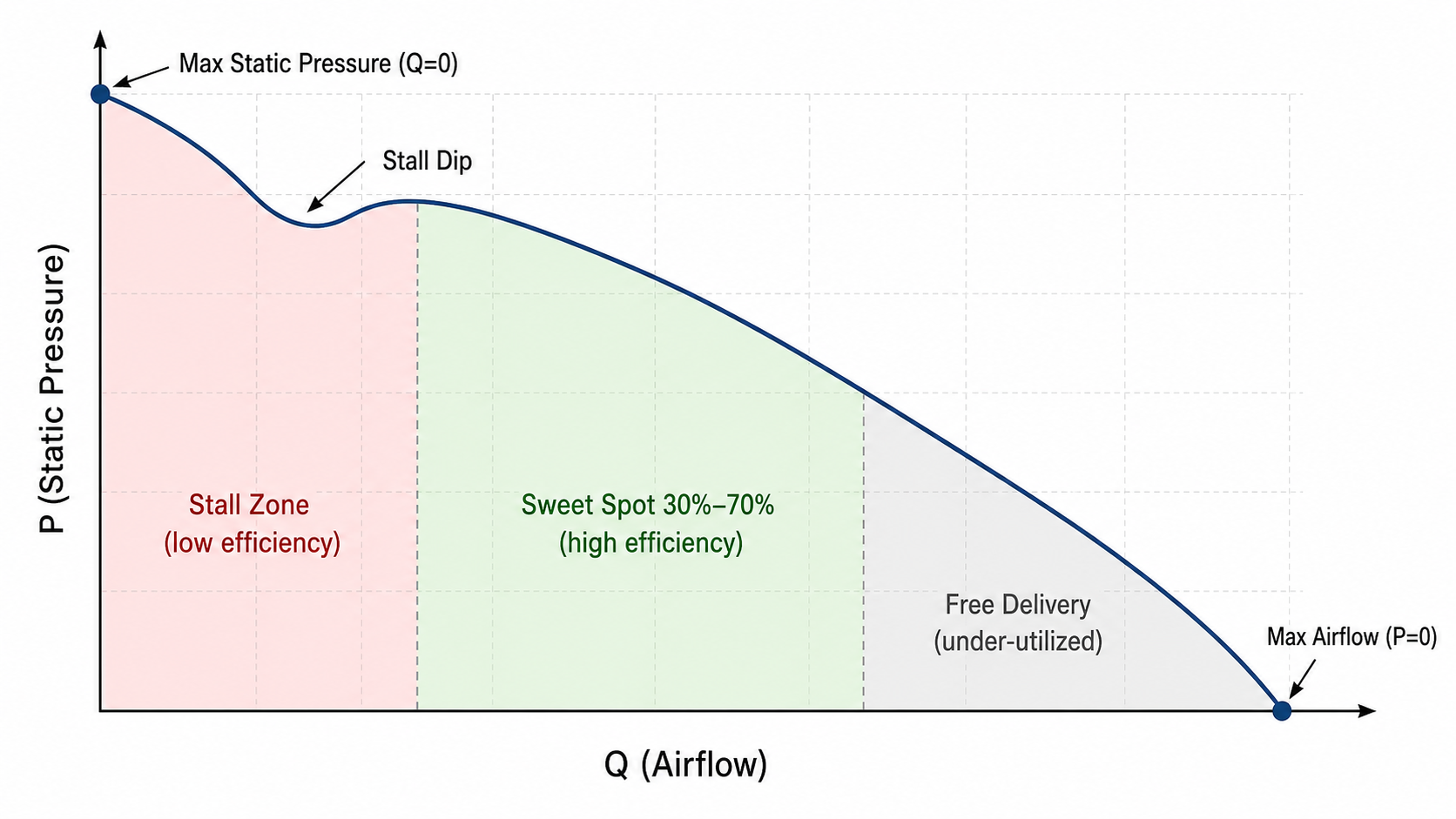
| Bottom-right (max Q, P=0) | Free-delivery point — maximum airflow with zero resistance on either side of the fan | "Max Airflow" / "Free-delivery CFM" |
| Top-left (Q=0, max P) | Shut-off point — maximum static pressure when the outlet is fully blocked | "Max Static Pressure" |
| Middle region | Normal operating zone — where the fan actually runs | Datasheets usually only mark the endpoints; you need the P-Q chart to see the middle |
Many supplier datasheets only give "Max Airflow" and "Max Static Pressure" — that only describes the two endpoints; how the curve behaves between them requires the P-Q chart. A fan without a P-Q chart is like a car spec that gives you only top speed and maximum gradeability, with no torque curve — you have no idea what it can do at any intermediate RPM.
Typical axial fan P-Q curve
Operating point: where two curves intersect
"What the fan can do" is defined by the fan P-Q curve; "what the enclosure demands" is defined by the system curve. The two lines cross at one point — that is the operating point, representing the real airflow + static pressure when the fan is running.
The operating point directly determines three things:
- Actual airflow — the real number that does the cooling (not the headline CFM)
- Actual power consumption — fan power draw at different operating points can vary by 30-50%
- Actual noise — the closer the operating point is to the upper-left (high static pressure), the louder the fan typically gets
How the system curve is built
The system curve describes "the relationship between the enclosure's resistance to air and airflow". The physics rule is:
ΔP = k × Q²
In plain English: resistance is proportional to the square of airflow — double the airflow, quadruple the resistance. The system curve is therefore an upward-curving parabola starting at the origin. k is a constant set by enclosure geometry, jointly determined by filter density, fin spacing, intake/exhaust opening area, duct bends, and internal obstructions.
Factors that affect k (resistance magnitude)
| Factor | Effect on k | Practical guidance |
|---|---|---|
| Total intake/exhaust opening area | Smaller area → k increases sharply | Aim for opening area >30% of enclosure cross-section |
| Filter density and fouling | Fine filter + dirty → k increases 2-5x | Design with the worst case in mind |
| Internal obstructions (PCBs, cabling) | The more crowded, the higher k | Reserve sufficient airflow paths |
| Fin spacing and length | Dense fins + long path → k increases | Heat-exchanger pressure drop of 5-15 mmH2O is common |
| Duct bends | Each 90° bend adds 0.5-1.5x the straight-duct pressure drop | Especially important for HVAC ducts |
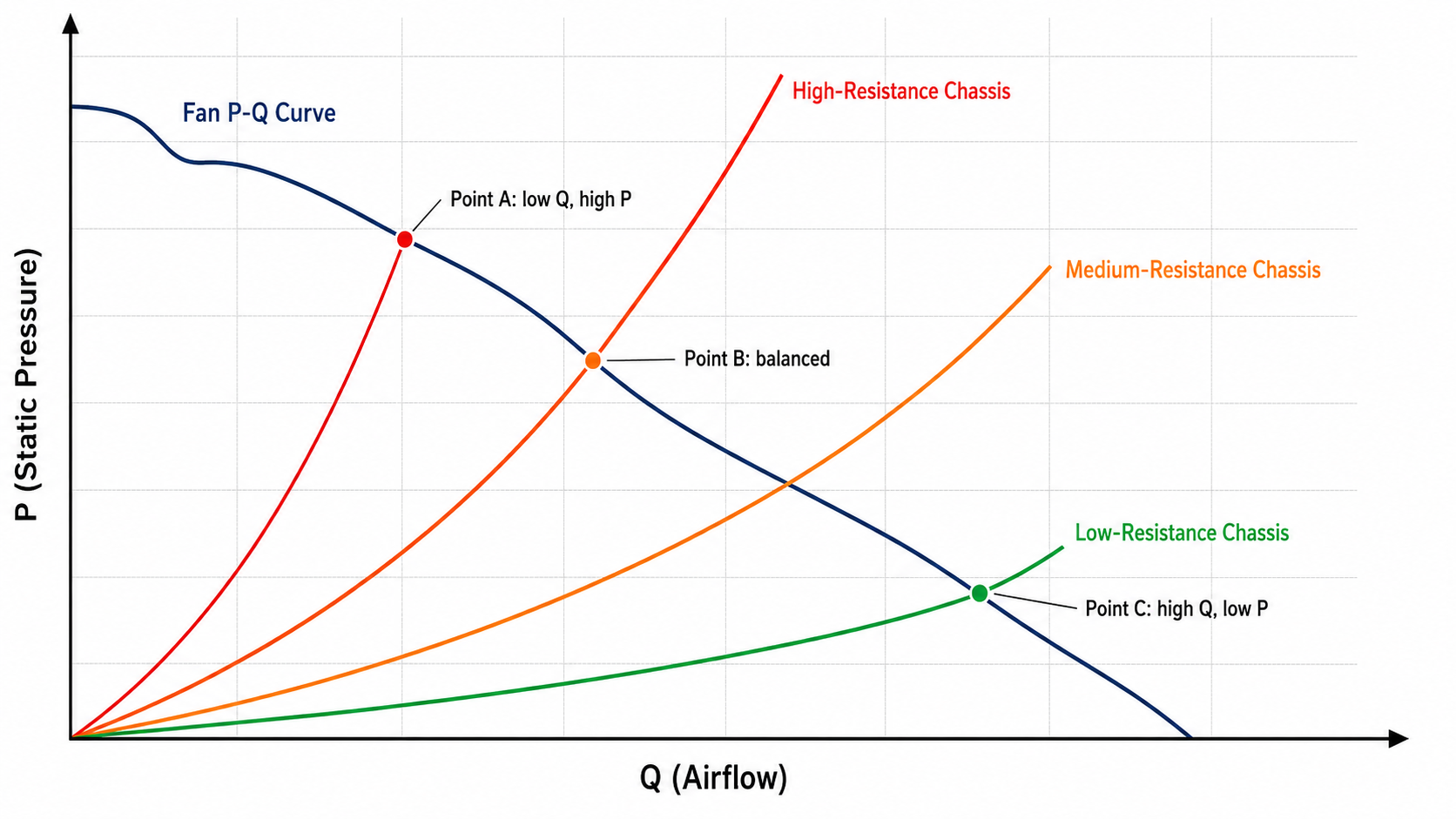
Same fan, different enclosures, very different operating points
The diagram below shows three different operating points for the same axial fan installed in three different enclosures:
P-Q shape of three typical fan types
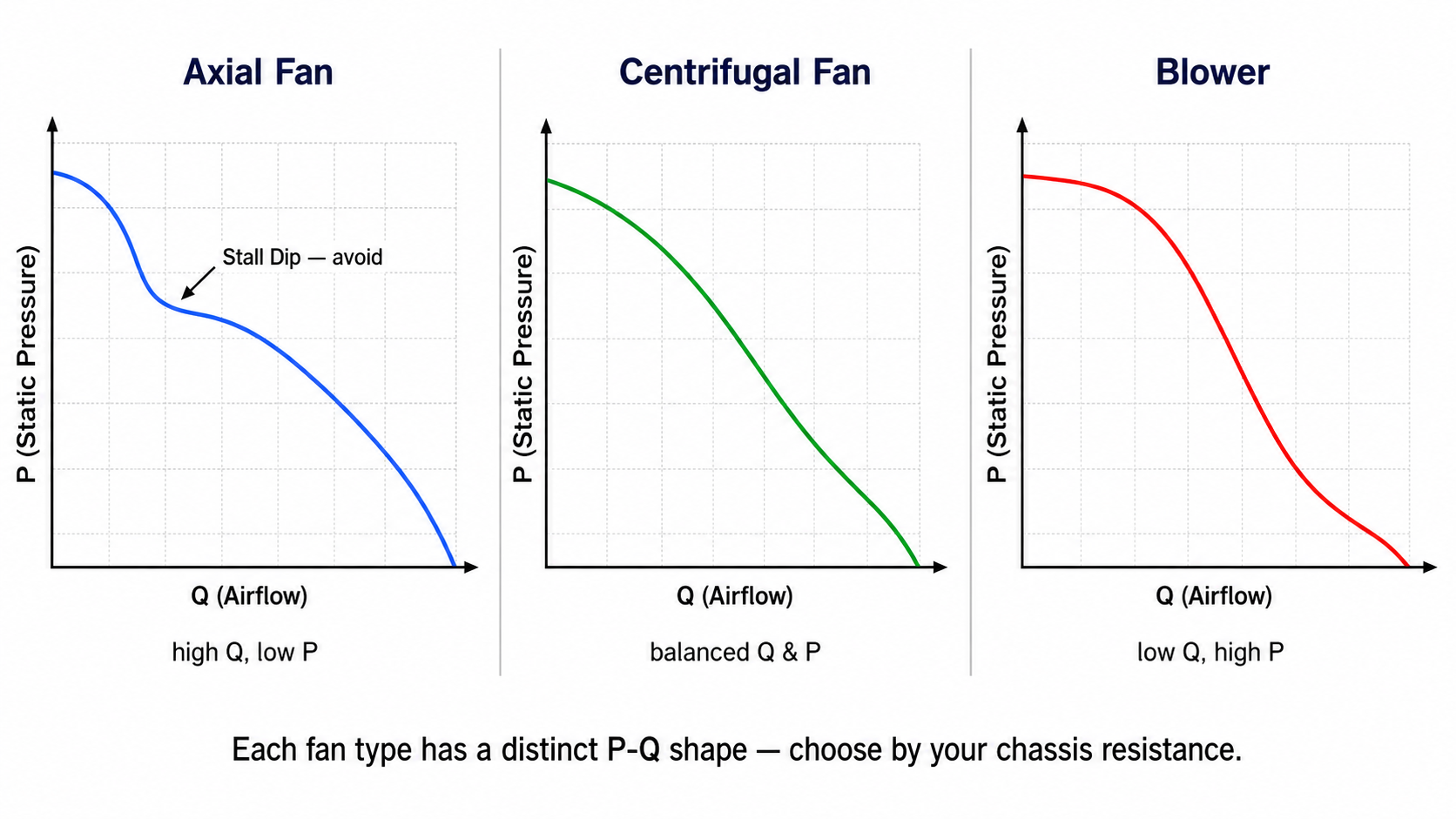
The P-Q curve shapes of different fan types differ greatly, which determines what applications they suit:
| Fan type | Typical max Q | Typical max P | Suitable applications |
|---|---|---|---|
| Axial Fan | 50 - 500 CFM | 2 - 15 mmH2O | Open / low-resistance cabinets, IT rooms, outdoor cabinets with dust filter, general ventilation |
| Blower | 10 - 100 CFM | 20 - 200 mmH2O | Long ducts, high-resistance cabinets, HVAC ductwork, automotive cooling |
| Centrifugal Fan | 20 - 300 CFM | 10 - 80 mmH2O | Medium-resistance applications, HVAC, mid-size machinery |
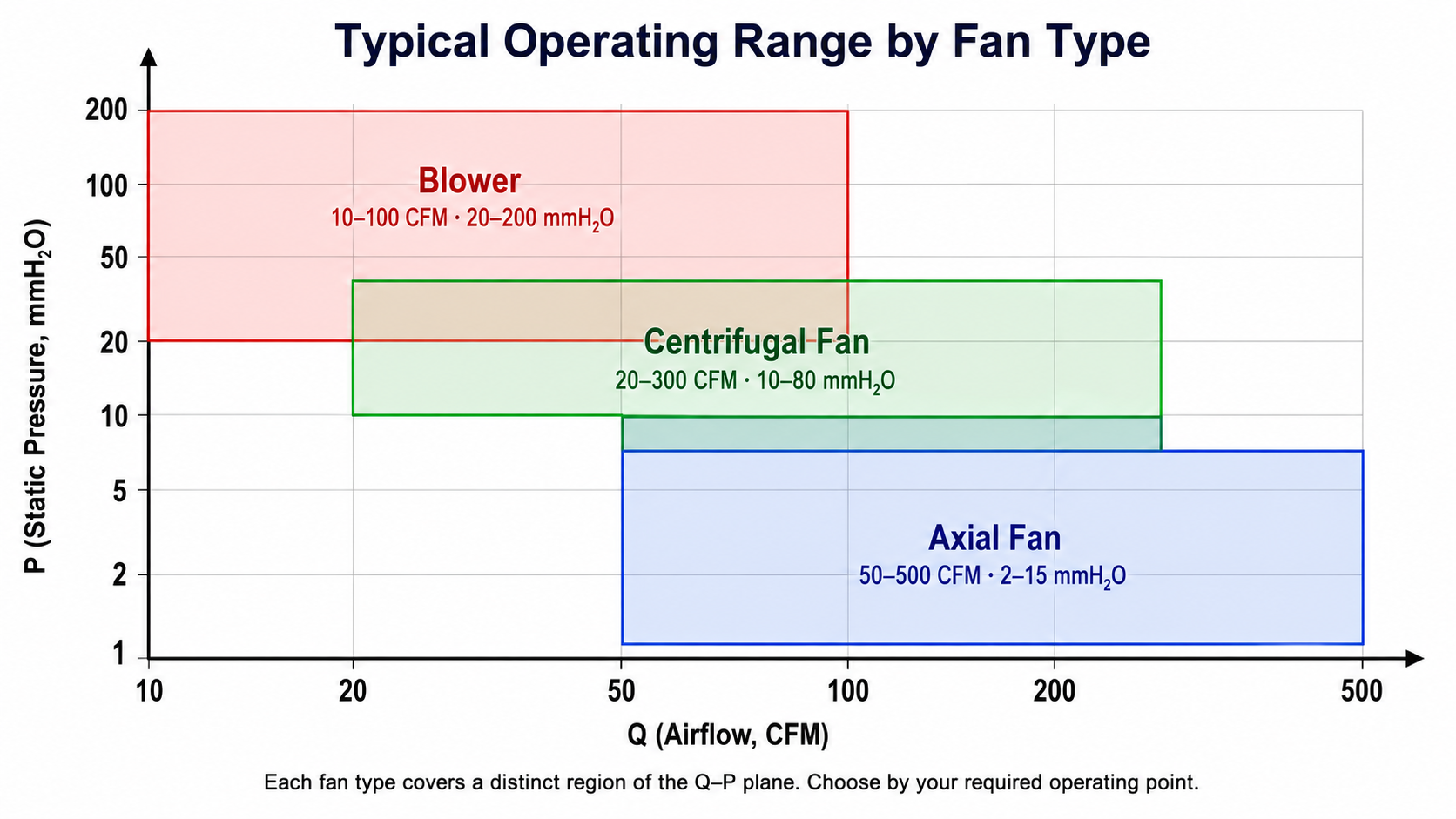
Axial fan curve characteristics
An axial fan P-Q curve typically has a stall dip in the middle — when the operating point is pushed near the maximum static pressure, flow separation causes a sudden efficiency drop. Therefore do not run an axial fan near the upper-left of its curve — not only is it noisy, but airflow becomes unstable, efficiency drops, and motor load oscillates.
Blower curve characteristics
The blower P-Q curve is smoother, has no stall problem, and runs stably over a wide range of static pressures. The trade-off is lower airflow than an axial fan of the same size.
Selection decision tree
- Estimated operating-point static pressure < 5 mmH2O → choose an axial fan
- Operating point 5-15 mmH2O → axial fan (38mm thick) or mid-size centrifugal
- Operating point 15-50 mmH2O → centrifugal fan or small blower
- Operating point >50 mmH2O → blower (axial cannot reach this pressure)
Where a valid operating point falls
The ideal operating point lies in the middle 30-70% region of the P-Q curve, away from both ends. Why?
| Region | Position | Issue |
|---|---|---|
| Right 0-30% | Too close to free delivery | Enclosure too open, fan capability wasted, possible over-spec costing money |
| Middle 30-70% | Sweet spot | High efficiency, low noise, high reliability ✓ |
| Left 70-100% | Too close to max static pressure | Axial fans may enter the stall region — efficiency drops, noise rises, long-term load oscillation |
* The 30-70% rule above is a general guideline for axial fans. Different fan types and different impeller designs have slightly different optimal regions (for example, blowers have a wider effective region). For a specific model, ask the fan supplier to mark the optimal operating zone on the P-Q chart, or validate with a sample test before finalizing the spec.
How to obtain your enclosure's system curve
Three methods, from most accurate to fastest:
Method A: CFD simulation (most accurate, requires expertise)
Use tools such as ANSYS Fluent, SimScale, or Autodesk CFD to build a 3D model of the enclosure, input filter resistance parameters, fin geometry, and intake/exhaust positions, and simulate the pressure drop at different airflow rates. The resulting system curve can be overlaid on the fan P-Q chart to locate the operating point. Pros: accurate; can be completed before the prototype is built. Cons: requires a CFD engineer; one modelling pass takes 2-5 days; software licenses are expensive. CFD work is normally performed by the customer's in-house CAE engineer or by an external CAE consultancy; MAX FLOW does not provide CFD services, but can supply detailed fan performance data (P-Q curves, noise, torque, speed curves) to the customer or consultancy as input data.
Method B: Wind tunnel / fan tester measurement (most direct)
Place the actual enclosure into a wind-tunnel test chamber and measure the pressure required to push different forced airflow rates through it. Equipment: a standard wind tunnel per AMCA 210 / ISO 5801, or an in-house fan tester. Pros: real-world data on a real unit. Cons: needs a physical sample; testing is expensive (an outsourced run is typically NT$ 30,000-100,000).
Method C: Estimation (fastest, large error)
Sum the pressure drops of each resistance source inside the enclosure:
- Inlet contraction: estimate from area ratio (10-30% area ratio → roughly 1-3 mmH2O)
- Filter: from the supplier's pressure-drop vs airflow curve (typically 1-5 mmH2O at rated flow)
- Fins / heat exchanger: from supplier spec (5-15 mmH2O is common)
- Duct bends: 0.5-1.5 mmH2O per 90° bend
- Outlet: similar to the inlet
Adding these up gives "total pressure drop at a given reference airflow" — that is one point on the system curve. Then use the ΔP ∝ Q² rule to extrapolate to other airflows.
* Estimation typically carries an error of ±30-50% and is suitable only for preliminary selection. Validate with Method A or B before finalizing the spec, especially for high-density applications (servers, medical equipment, automotive) — a 30% estimation error in those applications translates directly into thermal failures.
5 typical application scenarios
Large IT room with partially open rack front and rear doors, where the air-conditioning unit handles the overall temperature and the fans only provide local airflow boost.
Outdoor control cabinet with a dust filter at the intake and louvres at the exhaust. The interior is packed with PLCs, relays, and transformers.
1U server with short front-to-back distance, extremely high PCB density, dense CPU heatsink fins, and very high airflow resistance.
Commercial-building central air conditioning, with long-distance ducts, multiple bends, and end-of-line filters and diffusers.
Precision electronics inside medical equipment, requiring low noise, high reliability, and strict thermal margins.
6 most common selection mistakes
"A 200 CFM fan" sounds impressive, but that number is at zero resistance. Installed in an enclosure with a filter, you might only get 60 CFM.
A dirty filter increases pressure drop by 2-5x, the operating point shifts sharply leftward, and airflow plummets. The equipment overheats a few months into operation.
Parallel operation only approaches 1.7-1.9x in low-resistance systems and barely improves anything in high-resistance systems. Designs assuming 2x and end up undercooled.
The enclosure pressure drop is 50 mmH2O, but you bought an axial fan with max P = 8 mmH2O. It cannot push the air at all.
The fan inside the enclosure is the right pick, but the intake opening area is only 5% — the bottleneck is the opening, not the fan.
PC fan datasheets typically only list max CFM and skip the industrial-grade P-Q chart. Real-world performance in an industrial cabinet falls far short of the headline numbers.